
 Support Chat
 Login
LoginIf, after configuring SSH access and attempting to run any actions on the server, the agent reports that the terminal is unavailable to it due to a likely missing bubblewrap, socat — follow these steps:
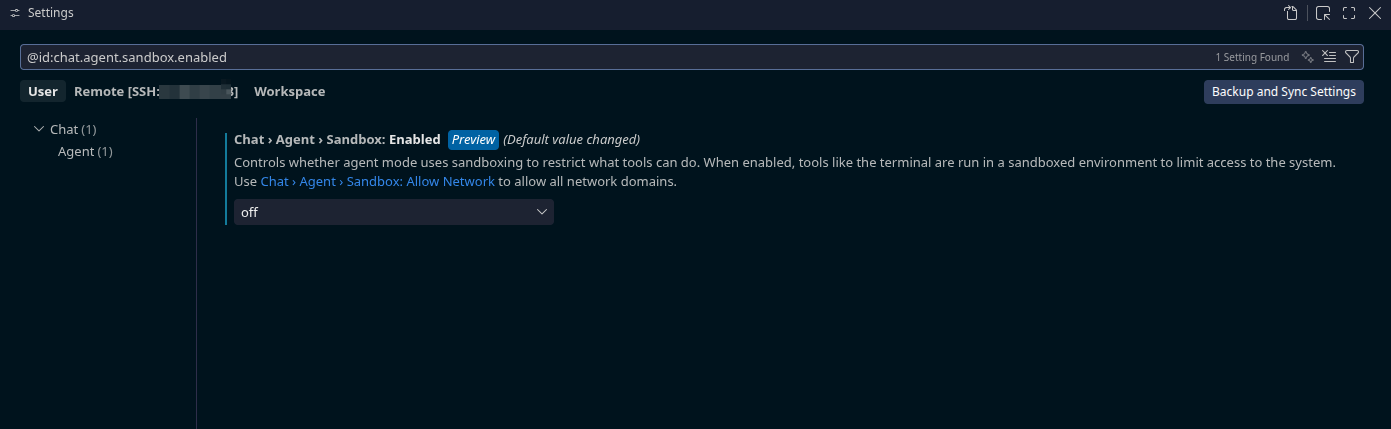
- Open the File → Preferences → Settings menu.
- In the settings search field, enter:
@id:chat.agent.sandbox.enabled - Find the option Chat › Agent › Sandbox: Enabled
Controls whether agent mode uses sandboxing to restrict what tools can do. When enabled, tools like the terminal are run in a sandboxed environment to limit access to the system. - Toggle the value from On to Off.
After that, you can try connecting again.