
 Czat wsparcia
 Logowanie
Jeśli po skonfigurowaniu dostępu przez SSH i próbie wykonania jakichkolwiek działań na serwerze agent zgłasza, że terminal jest dla niego niedostępny z powodu prawdopodobnego braku bubblewrap, socat — wykonaj następujące kroki:
- Otwórz menu File → Preferences → Settings.
- W polu wyszukiwania ustawień wpisz:
@id:chat.agent.sandbox.enabled - Znajdź opcję Chat › Agent › Sandbox: Enabled
Controls whether agent mode uses sandboxing to restrict what tools can do. When enabled, tools like the terminal are run in a sandboxed environment to limit access to the system. - Przełącz wartość z On na Off.
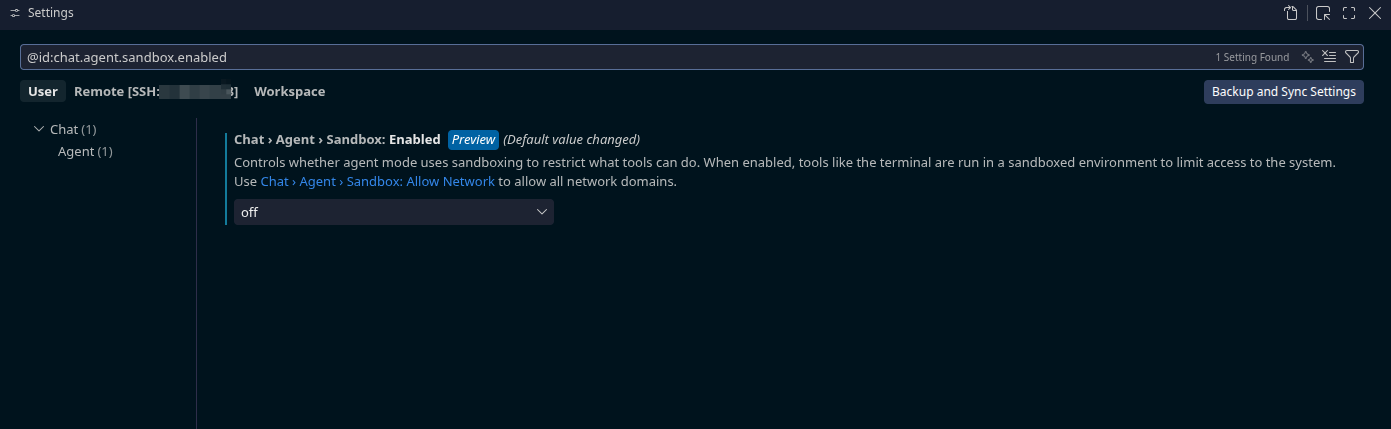
Następnie można ponownie spróbować się połączyć.